 By Gustavo Torres
Today you've run code written by dozens of strangers. Every web page you open brings its own JavaScript, and your browser runs it without asking. Every time you install a package with npm, the JavaScript package manager, the install scripts of that package and all its dependencies run on your machine. Every PDF you open goes through an interpreter for a format so complex that it contains a programming language of its own. Nobody has reviewed any of that code for you, and almost nothing ever goes wrong.
Almost nothing goes wrong because, in nearly all of these cases, something the code can't touch decides what it's allowed to do. A page's JavaScript can't read your files, even though the browser running it can. That piece has a name: a sandbox, after the box of sand that keeps children playing in one spot. The word gets used for very different things, from an interpreter with a few functions removed to a virtual machine per request, and for some things that isolate nothing at all.
This post covers what a sandbox is, where the idea comes from and what makes a good one. Then it walks through the ways to build one, ordered by where they put the boundary: inside the language, with WebAssembly, in the process with filters such as seccomp, in containers, with a kernel of its own such as gVisor, with minimal virtual machines such as Firecracker, or on another machine. After that come when to pick each one, what gets called a sandbox without being one, and when you don't need one at all.
What a sandbox is
A sandbox is an environment where code you don't trust runs with fewer permissions than it would have outside, and where those limits are enforced by something that code can't change. The second half is the part that matters. A program that promises not to read your files isn't in a sandbox. A program that tries, and gets an error back from the operating system, is.
Every sandbox has three parts:
- The boundary: what separates the isolated code from everything else. It might be a region of memory, a process, an operating system kernel or a whole machine.
- The enforcement point: the checkpoint every request crossing the boundary has to pass through, where it's decided whether to serve it. For a process, these are system calls, the functions a program uses to ask the operating system kernel for something: opening a file, opening a connection, starting another process.
- The policy: the list of what's allowed. It can be as simple as "no network" or as detailed as "may read this directory, write to that one and connect to this port".
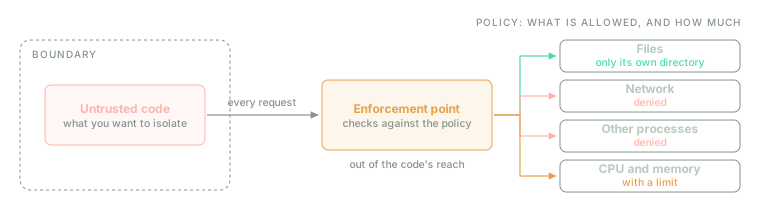
The isolated code never touches resources directly: it asks for them, and the enforcement point decides. The policy covers how much as well as what, because CPU and memory can run out too.
What a sandbox protects is usually summed up in three words. Confidentiality: the code doesn't read what it shouldn't, such as your keys or another user's data. Integrity: it doesn't change what it shouldn't, such as your files or the system itself. And availability: it doesn't hog everything. An infinite loop, or a program that keeps allocating memory, steals nothing but leaves everyone else without service, so a complete sandbox also limits CPU, memory and time.
The idea of an enforcement point is more than fifty years old. In 1972, a report James Anderson wrote for the US Air Force called it the reference monitor: the component that checks every access a program makes to a resource. It also set three conditions that are still the best way to judge a sandbox. The monitor must be invoked always, with no path around it; it must be tamper-proof against the code it watches; and it must be small enough to review and be confident it's correct. Three years later, Jerome Saltzer and Michael Schroeder added the principle that shapes policies: least privilege, under which every program gets the permissions its job needs and no more.
Where it comes from
The parts are much older than the word.
In the 1960s, computers were shared by many users at once, and the problem was keeping one person's program from breaking another's. IBM's answer, in 1967, was CP-67, which gave each user their own virtual machine: a simulated copy of the whole computer, running its own operating system. Multics, the time-sharing operating system built by MIT, General Electric and Bell Labs, went into service in 1969 with protection rings: privilege levels in which code in an outer ring can only ask an inner ring for things through defined gates. Today's processors still have those rings, and the operating system kernel lives in the most privileged one.
In 1973, Butler Lampson described the confinement problem: how do you run a program so that it can't tell anyone what it has seen, other than whoever called it? His answer was that it's harder than it looks, because a program can leak information through channels never designed for communication, such as how long it takes to respond.
In 1979, the seventh edition of Unix shipped chroot, which makes a process see a given directory
as if it were the root of the disk. It wasn't designed for security, but people used it for
security for years (we'll see later why it isn't enough).
The word itself arrived in 1993. Robert Wahbe and his co-authors wanted to run untrusted code in the same process as the main program, without paying for a process switch on every call. Their technique, software-based fault isolation (SFI), rewrote the untrusted code so that every memory access was forced to stay inside its own region, and they called that operation sandboxing.
Java applets followed in 1995: programs that a web page downloaded and the Java virtual machine ran with reduced permissions. It was the first sandbox used at scale by people who didn't know it existed, and also the first to show how hard it is to keep one sound: escapes kept turning up for years. The next year, Ian Goldberg, David Wagner and their co-authors presented Janus, which locked down a browser's helper programs (the ones that opened, say, a downloaded PDF) by filtering their system calls. That is, almost word for word, the idea Chrome uses today.
In 2000, FreeBSD, an operating system from the Unix family, added jails: chroot plus isolation
of processes, users and network, and the direct ancestor of containers. Linux gained seccomp in
2005. Then 2008 brought two developments at once: Chrome launched with each tab in a locked-down
process, and Linux added cgroups, which limit how much CPU and memory a group of processes can use.
In 2013, Docker, a container tool, popularised them, along with namespaces, as a way of packaging
applications.
In 2017, WebAssembly reached all four major browsers. Then, in January 2018, Spectre was published: a family of attacks that exploit the way processors run instructions ahead of time, before they know whether they should, to read memory the program has no access to. Spectre broke an assumption many sandboxes rested on: that if the language stops two programs in the same process from reading each other's memory, they can't do it in practice either. That same year, Google released gVisor and AWS (Amazon Web Services, Amazon's cloud) released Firecracker, and Landlock arrived in Linux in 2021.
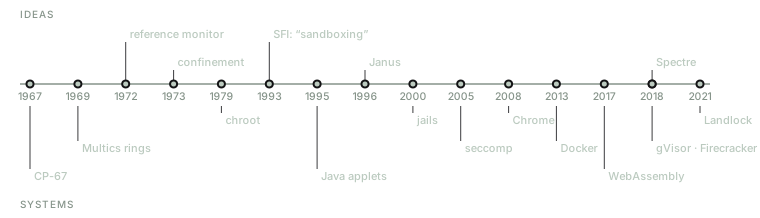
Fifty years of sandboxes. The ideas from the 1970s are still the ones we use to judge today's systems.
What makes a sandbox good
Anderson's three conditions translate into concrete questions, and cost adds a few more.
How much of the enforcement point can be attacked? That's the attack surface: everything the isolated code can ask for, and can therefore try to misuse. Linux offers more than 350 system calls, and each one is a path into the kernel, with its own code and its own bugs. A sandbox that lets 300 through has more weak points than one that lets 36 through, and further down we'll see that this is exactly where the techniques differ.
What does it cost? There are three separate costs: how long a new environment takes to start, what's lost on every operation that crosses the boundary, and density, meaning how many environments fit on one machine at once. They range from microseconds and a few megabytes to seconds and hundreds of megabytes; the numbers for each technique are in its own section.
What code can run inside? That's compatibility. Some sandboxes run any Linux program untouched; others only run JavaScript, or code compiled to a special format.
What can be limited? Files, network, other processes and resources are different things, and not every mechanism controls all of them. The network deserves a special mention: it's the way out for whatever has been read.
Can you throw it away afterwards? An ephemeral environment, created for one task and destroyed when it's done, doesn't accumulate anything an attacker could leave lying in wait for the next task.
One last property belongs to no single mechanism but to how they combine: serious sandboxes come in layers. Chrome puts each page in its own process, filters its system calls and, since Spectre, keeps different sites in different processes. Firecracker itself runs inside a process with seccomp. The question isn't whether a layer has bugs, because they all do, but whether a single bug is enough to get out.
Where the boundary can go
What mainly sets the different ways of building a sandbox apart is how high up they put the boundary, and so how much the isolated code shares with everything else. The lower the boundary, the less is shared and the more it costs.
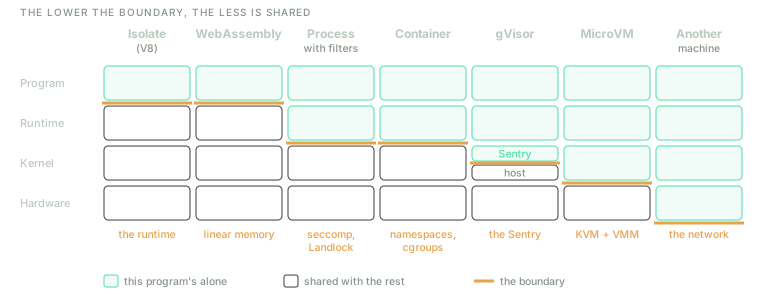
Whatever sits below the line is what a bug can reach from inside. That's why the options on the right are the ones used when the code comes from a stranger.
Inside the language
The highest boundary is the interpreter itself. The isolated program has no access to the functions that touch the system, because the interpreter simply doesn't offer them. Lua, a language designed to be embedded in other programs, makes this natural: you run the code in an environment that leaves out the file and process libraries. JavaScript engines do the same for every page.
The most powerful version is the isolates of V8, Chrome's JavaScript engine: independent environments, each with its own memory, inside a single process. Cloudflare uses them in Workers, its cloud functions platform, because they start in about 5 ms and take about 3 MB each, compared with 35 MB for a Node.js process (the server-side JavaScript runtime) running the same code.
The trouble is that the boundary is the whole interpreter, with its just-in-time (JIT) compiler to machine code, its optimisations and millions of lines of code, and any bug in it is an escape. In languages that weren't designed for this, introspection also leaves too many doors open. Victor Stinner spent three years building pysandbox for Python and gave up in 2013, calling it broken by design: every Python object leads to other objects, and from almost any of them you can eventually reach the dangerous functions. Java went down the same road more slowly. The Security Manager that confined applets was marked for removal in 2021 and permanently disabled in 2025.
Then came Spectre. In 2019, the V8 team published an analysis whose conclusion is in the title: Spectre is here to stay. On today's processors, no protection built into a language can stop a program from reading the memory of another that shares its process, and there's no known way to fix that in software alone. Chrome responded with Site Isolation, one process per website, which costs between 9% and 13% more memory. Since then, isolating inside a process only makes sense when it's combined with other layers, as Cloudflare does.
WebAssembly and software-based fault isolation
Wahbe's idea is alive and well under another name. WebAssembly (Wasm) is a low-level code format that C, Rust, Go and other languages compile to. A Wasm module has a single region of memory, its linear memory, and the compiler that turns it into machine code guarantees that every memory access lands inside it and every jump goes to a valid function. There are no pointers out and no instructions for calling the system: all the module can do beyond its own memory is call the functions the host hands it when creating it.
That's the difference from a process. A process is born with all of its user's permissions, and you have to take them away; a Wasm module is born with none, and you have to grant them. WASI (WebAssembly System Interface), Wasm's standard interface to the system, follows that capability model: the module can only open files inside the directories the host has explicitly handed it.
It's also the cheapest boundary. Wasmtime, one of the most widely used Wasm runtimes, creates an instance in about 5 µs when it reuses memory it has already reserved. That makes a fresh environment per request, or even per call, affordable.
There are two limits. The first is compatibility: the code has to compile to Wasm, and not every existing program does. The second is that the boundary is the compiler, and compilers have bugs. In 2023, a bug in Cranelift, the compiler Wasmtime uses, let a module read and write outside its memory on x86-64 processors. And because a module shares a process with its host, Spectre affects it just as it affects an isolate.
The process and operating system filters
A process is already a boundary, and a very good one: the processor, with the kernel's help,
guarantees that one process can't see another's memory, and anything it wants to do outside its own
memory goes through a system call. The problem is the default policy: a process can do everything
its user can. If your user can read ~/.ssh, so can any program you run.
Over the years, operating systems have added ways to restrict a process below the level of its user:
- seccomp, on Linux, filters system calls. It started in 2005 with a mode that only allowed reading and writing already-open files, and exiting; since 2012 it accepts filters written as small BPF (Berkeley Packet Filter, the kernel's packet-filtering language) programs, which can also inspect each call's arguments.
- Landlock, on Linux since 2021, lets any process, without administrator rights, restrict its own access to files and, in more recent versions, to network ports.
- AppArmor and SELinux are system-wide policies, written by the administrator, that say what each program may touch. Both are Linux Security Modules (LSM).
- On macOS, the system sandbox (which Apple calls App Sandbox for App Store apps) applies per-process profiles. On OpenBSD, pledge and unveil let a program give up whole families of calls and parts of the disk. On Windows, AppContainer gives a process an identity that starts with no permissions at all.
Chrome is the textbook example of how to combine them. In its original design, the browser was split into a main process, which had permissions, and renderer processes, which read and ran the web with no access to files or the network: they asked the main process for everything, and it checked every request. Its authors went through a year of critical bugs in other browsers and calculated that this split would have contained 70% of them.
On Linux, the practical way to use all this without writing filters by hand is a tool such as bubblewrap, which Flatpak (a system for distributing desktop applications) uses to lock its apps down: it mounts a trimmed-down view of the disk, removes the network and applies a seccomp filter.
The cost is almost nothing: just starting a process. The limit is that every process shares the same kernel, so a bug in it, reachable through an allowed call, is an escape. And the policy is hard to get right: a filter that's too strict breaks the program, and one that's too loose protects nothing.
Containers
A container isn't a new mechanism but a combination of those in the previous section with two more from the Linux kernel. Namespaces decide what the process sees: its own process tree, its own filesystem, its own network, its own users. Cgroups decide how much it uses: CPU, memory, number of processes. On top of that come Linux capabilities, which split administrator powers into pieces so a container can be stripped of the ones it doesn't need, and a seccomp filter. Docker's seccomp profile, from the most widespread container tool, disables around 44 calls out of more than 300.
That isn't many, and that's deliberate. Containers were designed to package and deploy applications, so the default profile's priority is to keep nearly everything working. The isolation they give is real, but underneath it all sits a single kernel shared with the host and with every other container. A bug in that kernel, or in the tools that create containers, is a way out. In 2019 it turned out that a process with administrator rights inside a container could, through a bug in runc, overwrite that very runc on the host (runc being the program that creates Docker's containers) and from there run whatever it liked outside.
There are ways to harden them. Rootless containers use a user namespace so that the administrator inside is an ordinary user outside, and that runc bug didn't affect them. A seccomp profile tailored to the specific program shrinks the surface a lot. With those in place, a container is a reasonable sandbox for code that doesn't come from a determined attacker. For code that might, the boundary has to go lower.
A kernel of its own in user space: gVisor
gVisor, released by Google in 2018, tackles the shared kernel without going all the way to a virtual machine. It intercepts every system call the isolated program makes and hands it to a kernel written in Go, the Sentry, which runs as an ordinary process. In 2019 it implemented 237 system calls. The Sentry, in turn, can make only 53 calls to the real kernel (68 if it uses the host's networking), and in the version studied, file access was handled by a separate process.
An exploitable bug in the Linux kernel is no longer enough: first you need one in the Sentry, which is written in a language without C's memory errors, and then another in the few calls the Sentry can make. The price is paid on system calls. Since 2023, the default way of intercepting them, systrap, uses seccomp itself to divert them, and each one costs a good deal more than in an ordinary process. According to gVisor's documentation, pure computation and memory access run at the same speed, but a program that makes lots of small network or file operations will feel it. And not every Linux system call is implemented, so the odd program won't run.
Virtual machines and microVMs
A virtual machine takes the boundary down to the hardware. The isolated program has its own operating system kernel, the guest, and the boundary is the hypervisor: the component that uses the processor's virtualisation extensions to make the guest believe it has a machine all to itself. On Linux the hypervisor is KVM (Kernel-based Virtual Machine), and it works alongside a virtual machine monitor (VMM), a process that simulates the devices: disk, network, console.
A bug in the guest kernel is no longer a way out, because the attacker only controls their own kernel. What stays exposed is the interface to the hypervisor and the simulated devices, which is far narrower than 350 system calls. But it isn't invulnerable. In 2015, a bug known as VENOM let code escape from virtual machines running on QEMU, an emulator widely used as a VMM, through its simulated floppy disk controller, which was still there even though nobody used floppy disks any more.
AWS took that lesson to heart with Firecracker, released in 2018: a VMM written in Rust with a handful of devices (network, disk, console and little else) that runs inside a process whose seccomp filter allows it 36 system calls. According to the paper describing it, each microVM boots to application code in under 125 ms and takes under 5 MB on top of the memory the program uses, and a single server can create up to 150 a second. It's what isolates the functions of AWS Lambda, Amazon's cloud functions service, and it's what has made a virtual machine per task viable. Kata Containers applies the same idea to containers: you use them like ordinary containers, but each one runs inside its own lightweight virtual machine.
The cost is a whole kernel per environment: more memory, a boot time of tens of milliseconds at best and seconds for a full virtual machine, and more network latency, since traffic passes through two kernels. In return, compatibility is total: any Linux program runs inside.
Container, gVisor and microVM, measured
In 2020, Anjali, Tyler Caraza-Harter and Michael Swift, of the University of Wisconsin-Madison, put the last three options side by side and counted how many system calls each one allows itself towards the host kernel.
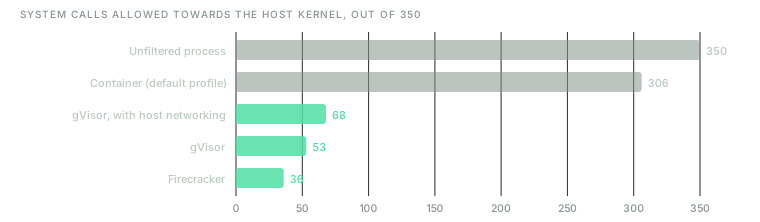
With gVisor and Firecracker, the isolated program never calls the host kernel: these are the calls made by the component acting as the boundary. The versions measured date from early 2020.
A container lets almost everything through; gVisor and Firecracker allow only a small fraction of that. But the number of calls isn't the whole story. The same study measured how many lines of the host kernel ran under each platform, and the ones allowing the fewest calls weren't the ones using the least kernel: the unisolated program ran 7.8% of the kernel's 806,318 lines, Firecracker 9.6%, a container 11.2% and gVisor 11.3%. Isolation is code too, and that code lives in the kernel as well. What changes is who can reach it: in a container, the isolated program directly; in the other two, only the component acting as the boundary.
Another machine
The lowest boundary is to share nothing: running the code on a separate computer, connected only by the network. It's what clouds do when they offer servers dedicated to a single customer, and what's done for the most sensitive environments. It even rules out side-channel attacks such as Spectre, which need a shared processor. The cost is an entire machine, and the boundary becomes the network: what the isolated machine can reach over it is what the policy has to decide.
Which one to choose
No sandbox is better than all the others; each situation has one that suits it, and the choice nearly always comes down to two questions. First: who wrote the code, and what would they gain by getting out? A colleague's script might have a bug; a program a stranger sends you might be designed to escape. The more hostile the code might be, and the more different customers share the machine, the lower the boundary has to go. Second: how much do the isolated code and its host talk to each other? If the host calls the isolated code thousands of times a second, every crossing of the boundary counts, and that pushes the boundary up.
| Situation | Sensible boundary | Why |
|---|---|---|
| Extensions inside your application that are called constantly | WebAssembly, or a trimmed-down interpreter such as Lua | Microseconds per instance, cheap calls, and a module that has only what you give it |
| Converting files anyone can upload: images, PDFs, documents | The converter in a separate process, with seccomp or Landlock and no network | What fails is the format reader, not your code, and isolating it costs almost nothing |
| A service that runs its users' code: an online coding judge, a shared notebook | A hardened container, or gVisor | They run any Linux program; gVisor takes the shared kernel out of the picture |
| Strangers' code on machines shared by many customers: cloud functions, continuous integration for public projects | A microVM or a disposable virtual machine | No single kernel bug is enough to get out, and the environment doesn't outlive the task |
| A program that processes hostile content all day: a browser, an email client | Separate processes with the system's filters | It's what Chrome does: the process that reads the web has no permissions |
| Your own scripts, with your own data | None | See below |
Two of those examples deserve a closer look. The converter case is more common than it seems: in 2016, ImageTragick, a set of bugs in ImageMagick, a widely used image conversion library, let anyone run commands on any server that converted an image a user had uploaded. The server was well written; the bug was in a library that processed hostile data with all of the server's permissions. And continuous integration is why the GitHub Actions security guide advises against running public projects' jobs on your own machines: anyone can open a pull request containing code that will then run on that machine.
Layers add up. A container inside a virtual machine dedicated to one customer is a very common combination, and gVisor and Firecracker themselves run locked down by seccomp.
What isn't a sandbox
The word gets applied to plenty of things that don't meet the definition: either there's no boundary, or the code inside can change it.
chroot on its own. Its own man page
says so: it isn't intended for any kind of security purpose, neither to sandbox a process nor to
restrict its system calls. It changes how paths are resolved and nothing else, and a process with
administrator rights gets out of it with three commands.
A container with the door left open. According to
Docker's documentation, a container started with
--privileged gets every capability and access to every device on the host. A container that
mounts the Docker socket, /var/run/docker.sock, can ask Docker itself, which runs as
administrator, to create another container with the host's entire disk mounted. Either way, the
container still exists, but it no longer isolates anything.
A Python virtual environment (venv) or a version manager such as nvm. They keep one project's
dependencies separate from another's; they don't restrict permissions. The code running inside can
do everything your user can.
A list of allowed commands, matched by name. Allowing git but not rm looks like a policy, but
it limits what the program is called, not what it does. git -c alias.x='!…' x runs whatever
command follows the !, find . -exec runs any command at all, and npm test runs whatever the
project's package.json says. A policy has to talk about effects (which files, which network), and
the enforcement point has to see them, not guess them from a program's name.
A memory-safe language. Rust keeps your program free of the memory bugs that open the door to so
many attacks (the post on C and Rust covers this), but it doesn't stop a
malicious dependency from doing, with your permissions, exactly what it wants: its build.rs file
runs at compile time. Memory safety protects against mistakes, not intentions.
A test environment. Some payment providers call their test environment a sandbox, where charges aren't real. That's a legitimate use of the word, but it means "nothing here is for real", not "the code here is locked down".
An enclave. Trusted execution environments (TEEs), such as Intel's SGX (Software Guard Extensions) and TDX (Trust Domain Extensions), or AMD's SEV (Secure Encrypted Virtualization), also isolate code, but in the opposite direction: they protect the program inside from the operating system and hypervisor running it. They exist so that the machine's owner can't see your data, not so that your code can't touch their machine.
When you don't need one
A sandbox is a tool against one specific risk: running code that can do more than it should. If that risk isn't there, you don't need one.
When the code is yours and already runs with your permissions. Your scripts, your application on your server. Applying least privilege is still a good idea (a dedicated user for the service, with no access to what it doesn't need), but that's hygiene, not a sandbox against an attacker who isn't there.
When the risk isn't running code. If you're worried that one user could read another's data through your application, what's missing is authorisation: checking, on every request, that this user is allowed to see that. No sandbox fixes it, because your code is doing exactly what it should, just for someone who shouldn't be getting it.
When the input is data, and not running it is enough. The best way to isolate code is not to run it. Reading a JSON file with a JSON parser runs nothing. Reading it with something that can rebuild arbitrary objects, such as Python's pickle, does; its documentation warns against using it on data you don't trust. Choosing a format that can only hold data removes the risk instead of locking it up.
When the environment is already disposable and holds nothing. A virtual machine created for a single task, with no credentials and no access to anything valuable, and destroyed afterwards, is already a sandbox. Putting another one inside may add nothing.
When it costs more than it protects. A sandbox costs performance and complexity, and some programs stop working inside one. Sometimes the right answer is to accept the risk.
And a warning for when you do need one: a sandbox doesn't protect what you let through on purpose. Put a key in the isolated process's environment variables and the code inside can read it. Mount your home directory so the program can reach one file and it can reach them all. Give it network access to download a dependency and it can also use the network to send out whatever it has read. Most sandboxes that fail in practice don't fail because of the mechanism but because of the policy: because of what someone chose to leave inside to make things work.
What to take away
If you take away one thing, make it this: a sandbox is a boundary enforced by something the code inside can't change, and choosing one means deciding how high up to put that boundary. The lower it goes, the less the isolated code shares with everything else, and the more it costs.
And if you take away three more, make them practical.
Place the boundary according to who's attacking. For trusted extensions, the language or WebAssembly. For programs that process hostile data, a process with filters. For strangers' code on a shared machine, a virtual machine. A container with its default settings is great for packaging, but it isn't built to hold back an attacker.
Write the policy in terms of effects. Which files, which network, how much CPU and memory. A list of program names isn't a policy, and a policy that leaves the network open leaves the way out open for everything else.
Check what you leave inside. Keys, mounted directories, sockets, network. The mechanism rarely fails; what fails is whatever someone put inside to get the program working.
Fifty years ago, Anderson asked for an enforcement point that is always invoked, that nobody can tamper with and that is small enough to verify. Every sandbox in this post is a different attempt to meet those three conditions at a price someone can afford to pay.